
Every event business sends two kinds of email: the ones your audience needs (your ticket confirmation, your judging round schedule, the final event info) and the ones they opted in to receive (early-bird launches, next year's save-the-date, speaker announcements). v2.50 finally gives you the tools to treat each kind appropriately — and the compliance posture mail apps have been quietly demanding.
Two new variables
Drop in a ready-made link, or build your own button.
One-click in the inbox
Gmail, Yahoo and friends show their own Unsubscribe button.
Attendees in control
Re-subscribe any time from their profile on the event site.
You keep critical sends
Order confirmations and event comms always reach everyone.
Two new variables
You've got two ways to add an unsubscribe affordance to a mailshot — pick whichever fits the design you want:
The ready-made link
Drop this variable anywhere in your mailshot and it renders as a standard unsubscribe link, styled consistently and ready to go.
The bare URL
Use this if you want to wrap the unsubscribe URL in your own branded button, link text, or footer design.
The big deliverability win
Mailshots now carry the standard unsubscribe headers.
Mail apps like Gmail and Yahoo can show their own native Unsubscribe button right at the top of your messages, thanks to the standard RFC headers now added to every mailshot. One click, and they're done. It's exactly what both platforms expect from bulk senders — so it also helps your mailshots reach the inbox in the first place.

One-click in the inbox
This is the headline deliverability change. Modern mail providers — Gmail and Yahoo especially — expect bulk senders to support one-click unsubscribe directly from the inbox header. v2.50 adds the required headers to every mailshot, which means:
Beyond keeping your recipients happy, playing by these rules helps your mailshots clear inbox filters more reliably. Everybody wins.
A confirmation page, on your event site
When someone unsubscribes, they land on a brand new 'Unsubscribe confirmation' page on your event site. The page is fully editable under Website > Pages, so you can make it feel like a natural part of your brand rather than a generic system page.
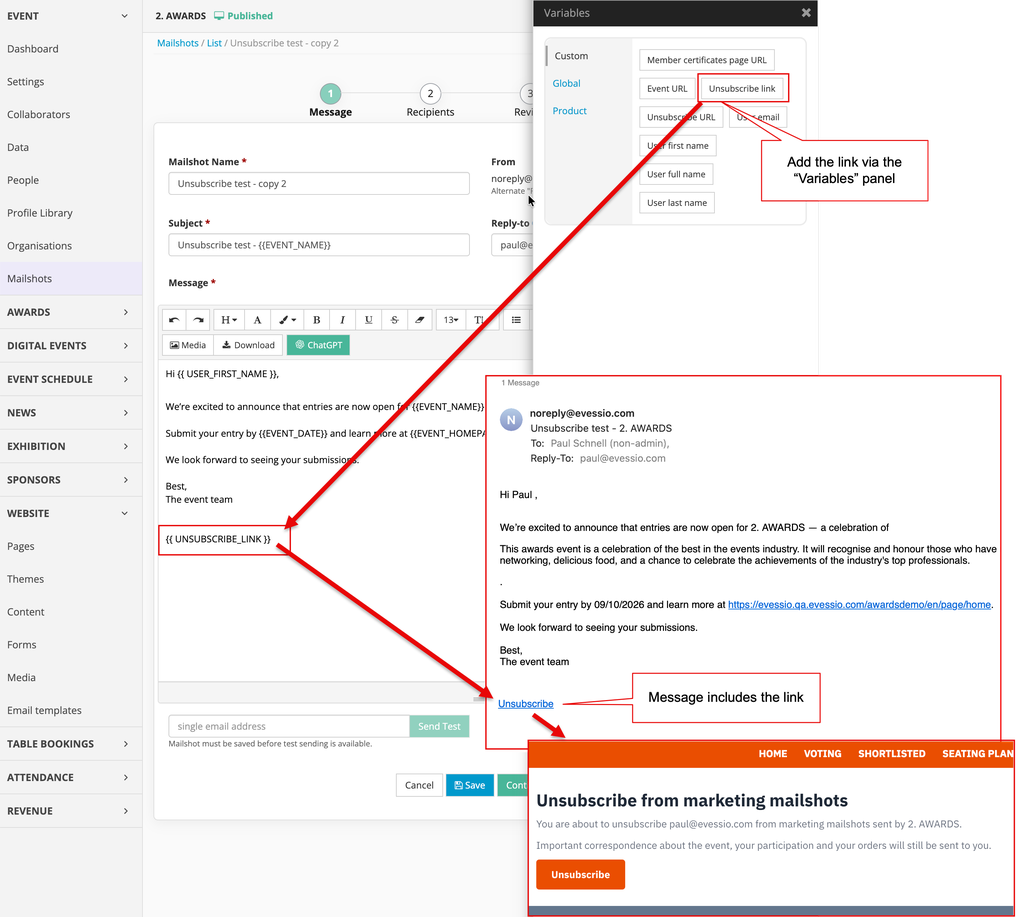
The unsubscribe experience, within your own event site.
Attendees stay in control
An unsubscribe isn't a one-way door. Attendees can revisit their choice at any time from their profile on the event site — unsubscribe, re-subscribe, change their mind again if they want to.
-
Managed from their profile
The preference lives right in their account on the event site. Clear, obvious, always available.
-
Reversible at any time
Changed their mind? They can subscribe again with a single click.
-
Group-level scope
Unsubscribing applies across every event in the same event group — no more having to opt out of each event's marketing separately.
You decide which mailshots respect it
Here's the piece that makes the whole thing work in practice. Not every mailshot is marketing. A ticket confirmation. A judging round deadline reminder. A "your invoice is attached" message. These need to go out regardless of marketing preferences — and v2.50 makes sure they do.
On the Recipients step of any mailshot, you'll find a new 'Include unsubscribed?' option:
For important event emails
Everyone receives them. Perfect for booking confirmations, order receipts, event-day info and any message where your audience needs to hear from you.
For marketing mailshots
Respects every unsubscribe. Perfect for save-the-date campaigns, early-bird promotions, speaker announcements and any opt-in audience communication.
A small decision point at send time — but it transforms how cleanly marketing and operational email can live side-by-side.
The compliance backdrop
Why this matters right now.
Over the last couple of years, Gmail and Yahoo have progressively raised the bar for bulk senders — one-click unsubscribe is now effectively mandatory for high-volume senders. v2.50 brings your mailshots fully in line with those expectations, which protects both your sender reputation and your audience's trust.

Everyone benefits
A cleaner opt-out system means fewer complaints, better inbox placement, happier subscribers and a crisper line between "marketing" and "service" email within your team. It's the kind of fundamental infrastructure that lifts every other mailshot you'll ever send.
Drop {{UNSUBSCRIBE_LINK}} into your marketing templates today, and you're good to go.
See it in action
Discover what Evessio can do for your events.
Book a demo or speak directly with our team to see how our mailshots tooling — and the rest of Evessio's award-winning platform — can take your event communications further.
